Instant API
Save the entity, call the endpoint
Every entity gets list, get, create, update and delete endpoints with filtering, sorting and pagination, described in your project's OpenAPI documentation.
Model entities, fields and relationships in the Anythink dashboard, the CLI or with Claude, and each entity gets a REST API the moment you save it.
Every task works three ways, and all of them change the same project. Here's one: an orders entity with a total and a status.
The Anythink dashboard
Point and click. Good for seeing the shape of your data.
The Anythink CLI
Repeatable, so the same model can be rebuilt in another project.
$ anythink entities create orders$ anythink fields add orders total --type decimal --required$ anythink fields add orders status --type varchar \--display select --options pending,paid$ anythink data list ordersClaude, through MCP
Describe the model. It runs the same commands and shows what changed.
you › “Create an orders entity with a required decimal total and a status select with the options pending and paid. Then show me the entity and its fields.”
Instant API
Every entity gets list, get, create, update and delete endpoints with filtering, sorting and pagination, described in your project's OpenAPI documentation.
Secrets
A secret field encrypts its value with AES-256-GCM before it's stored, so a customer's own API token can sit on their record without being readable in the database.
Location
A geo field powers radius and bounding-box search, nearest-first sorting, and the map view in the dashboard, with nothing extra to configure.
Operations
Pivot an entity against another entity or your payments data, with exists, count or value columns and a total row across the whole project.
Entities, 18 field types, relationships, CSV import and materialised views, editable in the dashboard, the CLI or through Claude.
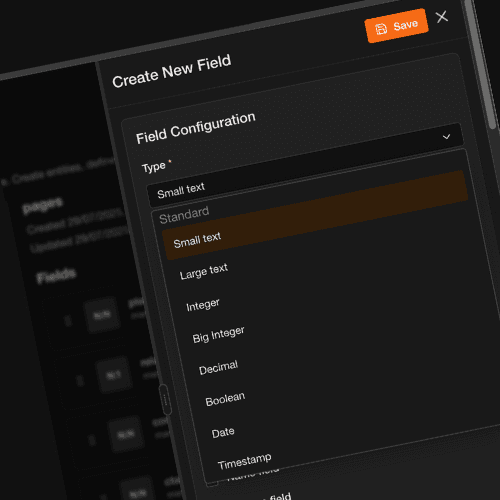
Text, rich text, selects, numbers, checkboxes, dates and timestamps, plus geo points, files, users, JSON and dynamic references. Each field's display type can change without changing how it's stored, so a text value can be an input, a select or a radio group.
One-to-one, one-to-many, many-to-one and many-to-many links, plus dynamic references that can point at records in different entities. Choose what happens on delete: cascade, set null, set default or restrict.
Add a secret field to any entity and its value is encrypted at rest with AES-256-GCM, the same mechanism that protects integration credentials. Values are masked when read back.
Create an entity and its list, get, create, update and delete endpoints exist straight away. Add a field and it's in the next response. There's no publish step and no migration file to write.
Upload a CSV, map its columns to fields, and save the mapping as a template for the next file with the same layout. Each import runs as a tracked job: pending, processing, completed or failed.
Join an entity with another entity, or with payments and subscriptions data, into one grid of exists, count or value columns with a project-wide total row. Configured in the dashboard, paginated on the server.
How it works
Name it in the dashboard, with the CLI or by asking Claude. Turn on row-level security or public read access when you create it, or later.
Pick a field type, then mark it required, unique, indexed or searchable, or give it a default value.
Add relationship fields between entities and choose what happens to linked records when one is deleted.
Import a CSV with a saved column mapping, or create records through the API.
Call the REST API from your app, search it, and work with it in the dashboard's grid, kanban, calendar and map views.
See it working
Describe an entity to the dashboard's AI chat and watch it appear in your data model.
Read the data modelling guide →There are 18 field types: input, textarea, rich text, select, radio, country select, checkbox, short date, long date, timestamp, JSON, geo, file, secret, relationship, entity select, user and dynamic reference.
Underneath, values are stored as varchar, integer, bigint or decimal (each with an array variant), text, boolean, date, timestamp, jsonb, geo, file, user or a relationship type. Changing a field's display type doesn't change how it's stored.
Yes. Add a relationship field and pick one-to-one, one-to-many, many-to-one or many-to-many, or a dynamic reference that can point to records in different entities. You choose the on-delete behaviour (cascade, set null, set default or restrict), and related records come back through the same entity API.
No. Creating an entity or a field from the dashboard, the CLI or an AI assistant changes the schema for you, and the REST API reflects it straight away. Fields can be required, unique, indexed or searchable, and can have default values.
Yes. Open the entity, choose Import, upload a CSV and map each column to a field. Tick Save these mappings as a template and the next import with the same columns reuses it. Each import runs as a job whose status you can check in the import history.
Still have questions?
Get in TouchEvery feature reads from the same data model, so each one you add works with the rest.
The dashboard, the CLI, MCP and the SDK, plus guides for moving from other platforms.
How founders, agencies and enterprise teams use Anythink.
Submit a request and talk to sales about getting you setup with your perfect account today